










Running a restaurant means making dozens of decisions every day. You need to manage incoming orders, monitor food costs, coordinate staff schedules, track inventory, process payments, and maintain a consistent customer experience.
When these activities depend on separate spreadsheets, manual records, and disconnected applications, even routine tasks can become difficult to manage. A delayed stock update can affect menu availability. Poor staff planning can slow down service. Inaccurate sales records can make it harder to understand where your business is losing money.
A Restaurant Management System brings these essential activities into a more connected operational setup. It helps restaurant owners manage daily workflows, access business information, and make decisions based on accurate data.
Whether you operate a single café, a full-service restaurant, a cloud kitchen, or a multi-location food business, the right Restaurant Management Software can improve visibility across your operations. This guide explains how these systems work, their key features and benefits, and what to consider when choosing a solution that fits your restaurant.
Key Takeaways
- A Restaurant Management System connects essential restaurant activities, including order processing, inventory, staffing, payments, and reporting.
- Restaurant Management Software can reduce manual work, improve operational visibility, and support more consistent decision-making.
- A Restaurant POS System manages orders and transactions, while a broader management platform connects additional front- and back-of-house functions.
- Restaurant Inventory Management helps monitor ingredient usage, purchasing, stock levels, and food waste.
- Restaurant Workforce Management supports staff scheduling, attendance, labor planning, and payroll coordination.
- The right solution should match your restaurant type, operating model, budget, existing tools, and future expansion plans.
What Is a Restaurant Management System?
A Restaurant Management System is a software-based setup that helps restaurants coordinate and monitor their daily business activities. Depending on the solution, it can bring together order management, billing, inventory, staff scheduling, payroll, customer information, and business reporting.
Instead of managing every function through a separate tool, restaurant owners can use connected modules to access operational information in one place. For example, when a customer places an order, the system can record the sale, send the order details to the kitchen, update relevant inventory records, and include the transaction in sales reports.
The exact capabilities vary by provider. Some platforms focus mainly on billing and order management, while others offer a wider range of tools for restaurant operations management. Businesses can also combine specialized applications through integrations to create a management setup that fits their requirements.
The main purpose is to make restaurant operations easier to monitor and manage. Owners gain better visibility into sales, expenses, inventory movement, and employee activity, while staff can follow more organized workflows during service.
Why Do Restaurants Need a Management System?
Restaurant operations involve several connected activities. A problem in one area can quickly affect another. For instance, inaccurate inventory records can lead to unavailable menu items, while poor workforce planning can increase labor costs and affect service quality.
A management system helps businesses handle these responsibilities with more structure. Here are some of the main reasons restaurants invest in one.
1. Better Control Over Daily Operations
Restaurant managers often need to switch between order records, staff schedules, purchase details, and sales reports. When this information is scattered across different tools, it becomes harder to understand what is happening during a shift.
A connected Restaurant Management System gives managers a clearer view of important activities. They can monitor incoming orders, review stock levels, check staff availability, and identify operational issues without collecting information manually from multiple sources.
2. Reduced Manual Work and Errors
Manual data entry creates room for mistakes. Employees may enter incorrect order details, forget to update stock records, or calculate working hours inaccurately. These errors can affect customer service, purchasing decisions, and financial records.
Restaurant Management Software automates several routine tasks. It can record transactions, update inventory based on sales, calculate employee hours, and generate reports. Automation does not remove the need for staff oversight, but it reduces repetitive work and makes information easier to verify.
3. Improved Food Cost and Inventory Control
Food costs have a direct impact on restaurant profitability. Without accurate stock records, businesses may over-purchase ingredients, experience shortages, or lose track of waste.
Restaurant Inventory Management helps owners monitor stock movement, track ingredient usage, and identify differences between expected and actual consumption. When connected with sales and recipe information, it can also provide a clearer picture of how menu items affect ingredient costs.
4. More Efficient Staff Management
A restaurant needs the right number of employees across different shifts and job roles. Understaffing can slow down service, while unnecessary staffing can increase labor expenses.
Restaurant Workforce Management helps managers plan shifts, monitor attendance, organize employee information, and review working hours. Some systems also support labor forecasting based on expected sales or customer demand, helping managers make more informed staffing decisions.
5. More Informed Business Decisions
Sales reports, inventory records, and labor information can reveal patterns that are difficult to identify through manual tracking. Managers can review their best-selling dishes, busiest service periods, food cost trends, and employee performance.
This information helps restaurant owners adjust menus, plan purchasing, manage staffing, and evaluate promotions. Instead of relying only on assumptions, they can use operational data to guide decisions.
Types of Restaurant Management Systems
A restaurant may use one integrated platform or several specialized applications to manage daily operations. The right combination depends on its business model, size, and operational requirements.
1. Restaurant POS System
A Restaurant POS System manages customer orders, billing, and payment transactions. It records dine-in, takeaway, and counter orders while helping staff manage daily sales.
Key features include order processing, menu management, payment handling, discounts, refunds, and sales reports. When connected with other management tools, a POS system can also share sales data for inventory and performance tracking.
2. Restaurant Inventory Management System
An inventory management system helps restaurants track ingredients, beverages, packaging materials, and other stock items. It provides better visibility into stock levels, purchases, and daily consumption.
Its main features include stock tracking, purchase management, ingredient monitoring, waste recording, and cost analysis. When integrated with a POS system, it helps managers compare sales with ingredient usage and identify potential stock losses.
3. Restaurant Workforce Management System
A workforce management system helps restaurants organize employee schedules, attendance, and shift-related activities. It allows managers to coordinate staff based on business hours, availability, and operational needs.
Common features include shift planning, attendance tracking, labor cost monitoring, employee records, and team communication. These tools help restaurants manage changing work schedules and maintain better control over staffing requirements.
4. Restaurant Reservation and Table Management System
Reservation and table management software helps restaurants manage bookings, seating arrangements, and table availability. It is particularly useful for dine-in businesses that handle reservations or high customer volumes.
Its features typically include online bookings, waitlist management, guest details, table status tracking, and booking reminders. This information helps managers prepare for expected customer traffic and organize staff accordingly.
5. Restaurant Customer Relationship Management System
A restaurant CRM system helps businesses manage customer information, preferences, visit history, and feedback. It gives restaurants a clearer picture of customer behavior and helps them build stronger relationships with repeat visitors.
Common features include customer profiles, loyalty programs, personalized offers, promotional campaigns, and feedback collection. Restaurants can use these insights to share relevant offers and create more personalized customer experiences.
6. Restaurant Accounting and Payroll System
Accounting and payroll systems help restaurants manage financial records and employee payments. They organize sales, expenses, supplier payments, wages, taxes, and financial reports in one place.
Some Restaurant Management Software platforms include basic accounting and payroll tools, while others connect with dedicated applications. These integrations reduce manual data entry and help maintain accurate financial and employee records.
Essential Features of Restaurant Management Software
The features available in a management platform determine how effectively it supports your restaurant’s daily activities. Some businesses need basic billing and inventory tools, while others require advanced reporting, multi-location controls, and integrations with third-party applications.
Consider these essential features when evaluating Restaurant Management Software.
1. Centralized Order and Menu Management
The system should allow staff to manage dine-in, takeaway, delivery, and counter orders through a consistent workflow. Managers should be able to update menu items, prices, categories, add-ons, and availability without complicated manual processes.
Centralized menu management is particularly useful for restaurants operating across multiple channels. It helps maintain consistent pricing and menu information across the POS, online ordering platform, and other connected systems.
2. Real-Time Inventory Tracking
Inventory tracking helps managers understand how much stock is available and which ingredients need replenishment. A useful system should support stock updates, purchase records, ingredient-level tracking, and low-stock alerts.
For more accurate Restaurant Inventory Management, look for recipe-level tracking. This allows the platform to estimate ingredient consumption based on the dishes sold. Managers can then compare expected usage with physical stock counts and investigate unusual differences.
3. Employee Scheduling and Attendance
Staff management features should make it easier to create schedules, record attendance, and monitor working hours. Managers should be able to assign employees to shifts based on their roles, availability, and expected customer demand.
A system with Restaurant Workforce Management capabilities can also help track overtime and labor costs. Employee access to schedules and shift updates can reduce communication gaps and last-minute confusion.
4. Integrated Payment Processing
A restaurant management platform should support the payment methods relevant to its customers. Depending on the business and region, these may include cash, debit and credit cards, digital wallets, and online payments.
Payment integration also helps maintain accurate transaction records. Managers can review completed payments, refunds, discounts, and other adjustments from the system. Before choosing a provider, check transaction fees, supported payment methods, settlement timelines, and hardware compatibility.
5. Reporting and Analytics
Reporting tools turn operational data into information that managers can use. Instead of reviewing individual records, owners can access summarized reports on sales, menu performance, labor, inventory, and expenses.
Useful reporting capabilities include:
- Sales by day, week, month, and location.
- Best-selling and low-performing menu items.
- Average order value and transaction volume.
- Food cost and inventory variance reports.
- Employee hours and labor cost summaries.
- Discounts, refunds, and voided transactions.
These insights support restaurant operations management by helping owners identify patterns, review performance, and make timely adjustments.
6. Cloud-Based Access
Cloud-based software allows authorized users to access restaurant information through supported devices and internet connections. Owners managing multiple locations can review performance without being physically present at every outlet.
However, cloud access should come with suitable security controls, data backups, user permissions, and reliable support. Restaurants should also understand what happens if their internet connection becomes unavailable and whether the POS supports offline transactions.
7. Multi-Location Management
Restaurant groups and franchises need a system that can manage several outlets without treating each one as an isolated business. Multi-location features can help centralize menus, monitor sales, compare performance, and manage access across branches.
The system should also allow location-specific settings where needed. Different outlets may have different operating hours, menus, tax requirements, suppliers, or staffing arrangements. A flexible platform should support these differences while maintaining centralized oversight.
8. Third-Party Integrations
Restaurants often use external tools for accounting, payroll, online ordering, delivery, reservations, marketing, and customer communication. Integrations help these applications share relevant information.
For example, a POS integration with an inventory platform can reduce duplicate data entry and improve stock visibility. Similarly, connecting sales records with accounting software can simplify financial reconciliation.
Before selecting a system, confirm which integrations are available, whether they require additional fees, and whether the data syncs automatically or needs manual intervention.
Benefits of Using a Restaurant Management System
A well-selected management platform can improve several areas of restaurant operations. Its value comes from how effectively it connects daily workflows and helps managers act on reliable information.
1. Streamlined Restaurant Operations Management
A connected system gives managers a more organized way to oversee orders, inventory, staffing, and sales. Employees can follow consistent processes, while owners can review key activities without collecting information from different sources.
This improves coordination between the front of house, kitchen, and management team. It also helps businesses identify delays and resolve operational issues sooner.
2. Improved Inventory Accuracy
Manual stock tracking can become difficult when restaurants handle many ingredients and frequent purchases. Automated inventory updates help reduce the effort involved in recording every stock movement.
Restaurant Inventory Management tools can also highlight unusual usage, wastage, and low stock levels. This helps managers plan purchases more carefully and reduce the risk of overstocking or running out of essential ingredients.
3. Better Labor Cost Control
Labor planning affects both service quality and operating expenses. Workforce tools help managers compare scheduled hours with actual attendance and identify shifts that require adjustments.
Restaurant Workforce Management also makes employee records easier to maintain. Managers can review availability, track working hours, and organize staffing information through a centralized workflow.
4. Faster Service and Better Order Accuracy
A connected Restaurant POS System can send orders directly to the appropriate kitchen station. This reduces reliance on handwritten tickets and repeated communication between servers and kitchen staff.
Digital order records also make it easier to track modifications, special requests, and order status. As a result, teams can coordinate service more consistently during busy periods.
5. More Accurate Business Reporting
When sales, labor, and inventory data are connected, managers can review restaurant performance with greater clarity. They can identify high-revenue periods, monitor operating expenses, and understand which menu items contribute most to sales.
These reports can support decisions about menu changes, promotions, purchasing, and staffing. The information is most useful when records are updated consistently and managers understand how each metric is calculated.
6. Support for Business Growth
A system that supports multiple outlets, centralized reporting, and flexible integrations can help restaurants expand without rebuilding their entire operational setup.
As the business grows, owners can add users, locations, modules, and integrations according to their needs. Choosing scalable Restaurant Management Software early can reduce the disruption associated with replacing disconnected tools later.
How to Choose the Right Restaurant Management System
Selecting a system requires more than comparing feature lists. The platform should fit your current workflows, support your team, and accommodate the way your restaurant plans to grow.
Use the following steps to evaluate your options.
1. Identify Your Restaurant’s Requirements
Start by reviewing how your restaurant operates. A quick-service restaurant may prioritize order processing and kitchen coordination, while a full-service restaurant may need table management, reservations, and detailed customer records.
Cloud kitchens, cafés, food trucks, and multi-location businesses also have different operational requirements. List your existing challenges and identify which activities need the most improvement.
2. Define the Essential Features
Separate must-have features from optional additions. For example, a small restaurant may initially need a Restaurant POS System, inventory tracking, and basic sales reporting. A larger operation may require advanced purchasing, workforce management, payroll integration, and multi-location controls.
Prioritizing features helps prevent unnecessary spending and makes vendor comparisons more practical.
3. Check Ease of Use
Restaurant employees work in a fast-paced environment. They should be able to enter orders, update information, and access relevant functions without navigating complicated screens.
Request a product demonstration and ask employees from different roles to test the system. Evaluate the interface from the perspective of servers, kitchen staff, cashiers, and managers.
4. Evaluate Integration Capabilities
Check whether the platform connects with your existing payment gateway, accounting software, payroll tools, delivery channels, and other applications.
Also ask about integration costs, data synchronization, API availability, and technical support. A system that works well with your existing setup can reduce migration effort and avoid unnecessary operational changes.
5. Review Security and Data Management
Restaurant systems may store employee details, customer information, sales records, and transaction data. Check how the provider handles data encryption, user permissions, backups, and security updates.
Ask where the data is stored, who can access it, and what options are available for exporting your information. You should also understand the provider’s procedures for handling service interruptions and data recovery.
6. Compare Pricing and Support
Review the complete cost of ownership rather than focusing only on the subscription price. Consider setup fees, hardware, payment processing, integrations, employee accounts, training, and maintenance.
Customer support is equally important. Check the available support hours, response channels, training resources, and service commitments. A technical issue during peak service hours can affect orders and revenue, so reliable assistance matters.
7. Consider Future Scalability
Your operational needs may change as you introduce new menu categories, expand delivery, open additional locations, or launch a loyalty program.
Choose a system that can accommodate these changes without forcing you to replace every existing tool. Ask vendors about additional modules, user limits, location pricing, and the process for upgrading your plan.
How to Implement Restaurant Management Software
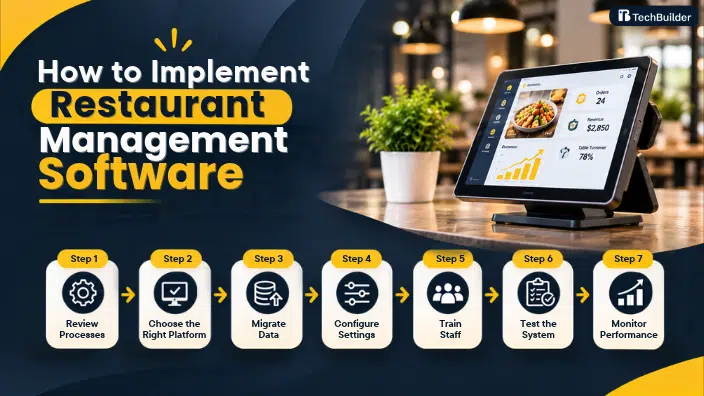
Choosing the right platform is only the first part of the process. Successful implementation also depends on preparing your data, configuring workflows, training employees, and checking whether the system works as expected.
A phased rollout can help restaurants introduce new technology without disrupting daily service.
Step 1. Review Existing Processes
Document how your restaurant currently handles orders, payments, stock, purchasing, staff schedules, and reporting. Identify where employees rely on manual records or repeat the same tasks across different applications.
This review helps you understand which processes need improvement and which existing workflows should remain unchanged. It also gives the implementation team a clearer picture of your requirements.
Step 2. Select the Right Platform and Modules
Choose a system based on the operational gaps identified during the review. Decide whether you need an all-in-one platform or separate applications connected through integrations.
Confirm the required modules, supported devices, user roles, reporting options, and third-party connections. Make sure the selected Restaurant Management Software can support your restaurant’s current operations and expected growth.
Step 3. Prepare and Migrate Business Data
Organize your menu, ingredient lists, supplier information, employee records, pricing, and other relevant data before migration. Remove outdated entries and correct inconsistencies to avoid carrying inaccurate information into the new system.
Ask the provider which data formats it supports and whether migration assistance is included. Test a sample of migrated records before using the platform for live transactions.
Step 4. Configure Workflows and Permissions
Set up menu categories, taxes, payment methods, kitchen stations, inventory units, employee roles, and reporting preferences. Configure access permissions so team members can use the features relevant to their responsibilities.
For example, cashiers may need access to order processing and billing, while managers may require additional permissions for refunds, discounts, and sales reports. Clear role definitions help maintain accountability.
Step 5. Train Employees
Training should cover the actual tasks employees perform during their shifts. Servers should learn order entry and table management, kitchen staff should understand incoming digital tickets, and managers should know how to review sales and operational reports.
Provide practical demonstrations and written instructions for common activities. A short training period before the full rollout can help employees become comfortable with the new system.
Step 6. Test the System Before Launch
Run test orders, payments, refunds, inventory updates, employee clock-ins, and reporting workflows. Check whether information moves correctly between connected applications.
Test different situations, including modified orders, cancelled transactions, unavailable menu items, and network interruptions. Resolve major issues before moving the system into daily operations.
Step 7. Monitor Performance After Deployment
Review how employees use the system and whether it is improving the processes identified during planning. Monitor order errors, stock discrepancies, labor records, and report accuracy.
Collect feedback from staff and managers. Use it to adjust configurations, improve training, and identify additional features that could support restaurant operations management.
How Much Does a Restaurant Management System Cost?
A Restaurant Management System typically costs between $1,000 and $50,000+, depending on the software type, features, integrations, and level of customization.
Basic subscription-based solutions may cost less, while custom platforms with POS, inventory, workforce management, and multi-location capabilities require a higher investment. Hardware, implementation, and ongoing maintenance can add to the total cost, so request a detailed estimate before choosing a provider.
Conclusion
Managing a restaurant involves more than serving good food. It requires consistent coordination between orders, inventory, employees, payments, and business reporting. A well-chosen Restaurant Management System brings these activities into a more organized workflow, helping owners reduce manual tasks, monitor costs, and make informed operational decisions.
The right solution should match your restaurant’s size, service model, existing technology, and plans for growth. Start by identifying your biggest operational challenges, then prioritize the features that can address them.
As restaurant businesses adopt more connected digital tools, investing in suitable Restaurant Management Software can help create a stronger foundation for long-term growth. TechBuilder can help businesses explore custom software solutions based on their operational goals, integration needs, and product requirements.
Whether you need to improve a Restaurant POS System, strengthen Restaurant Inventory Management, or streamline Restaurant Workforce Management, focus on building a solution that supports your team’s actual workflows and delivers measurable value.
Frequently Asked Questions
1. What is a Restaurant Management System?
A Restaurant Management System is a software platform or connected set of tools used to manage restaurant activities such as order processing, billing, inventory, employee scheduling, and reporting. It helps owners coordinate daily operations and access important business information through a more organized setup.
2. What is the difference between a Restaurant Management System and a POS system?
A POS system primarily handles orders, payments, billing, and sales records. A Restaurant Management System covers a wider range of activities, which may include inventory, workforce management, purchasing, payroll, customer information, and reporting. A POS system can be one component of a broader management platform.
3. How does a Restaurant POS System help restaurant owners?
A Restaurant POS System records customer orders, processes payments, manages menu pricing, and generates sales reports. It can also send orders directly to kitchen stations and help managers review transaction activity. When integrated with inventory software, it can support more accurate stock tracking.
4. Can a Restaurant Management System support multiple locations?
Yes. Many management platforms offer multi-location features that allow restaurant groups to monitor sales, menus, inventory, and employee activity across different outlets. Depending on the software, managers can also centralize reporting while maintaining location-specific pricing, menus, and operational settings.
5. How long does it take to implement a Restaurant Management System?
Implementation time depends on the platform and the complexity of the restaurant’s operations. A basic setup may require less configuration, while a customized system with multiple integrations and locations needs more preparation. Data migration, employee training, hardware installation, and testing also influence the timeline.